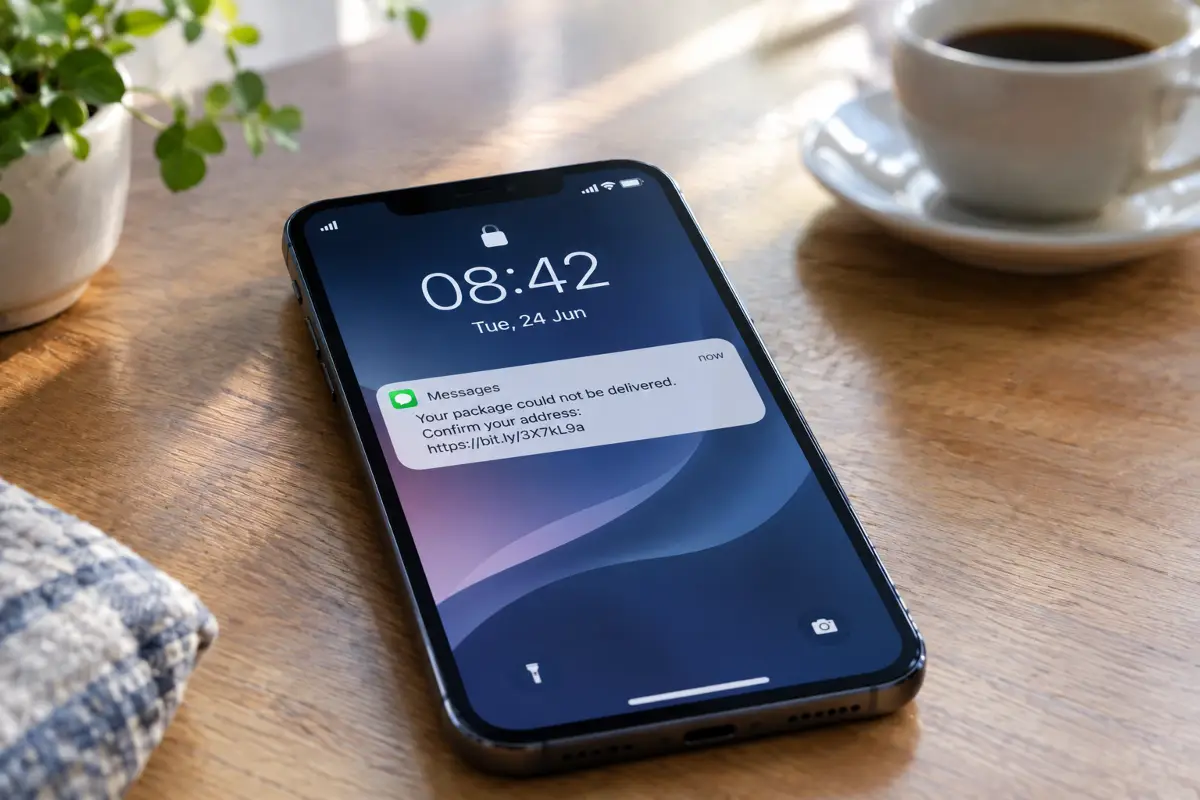
A scam text does not look like a scam. It looks like a delivery notice, a toll you forgot, a bank alert, or a stranger who typed the wrong number. It arrives while you are doing something else, it asks for one small action, and it gives you a reason to hurry. That last part is the real attack — everything else is set dressing. Once you know what the pattern looks like, these messages stop being convincing almost immediately.
Why text scams work so well
Most of us learned to be careful with email. Text messages never got the same treatment. A message on your phone feels closer, more personal, and it arrives in the same place as messages from your family, so the reflex is to read it as if a person wrote it to you.
The numbers reflect that gap. The US Federal Trade Commission recorded 470 million dollars lost to scams that began with a text message in 2024, more than five times the level reported in 2020. Verizon's 2026 Data Breach Investigations Report found that in phishing simulations, mobile routes such as text and voice produced median click rates around 40% higher than email. The mobile security firm Zimperium reported that SMS accounted for 69.3% of the mobile phishing it observed, far ahead of malicious PDFs and QR codes.
There is one more reason the messages keep coming: they are cheap. Sending a hundred thousand texts costs almost nothing, and a fraction of a percent responding is enough to make it profitable. You are not being singled out. You are in a spreadsheet.
The FBI's Internet Crime Complaint Center logged more than 2,000 complaints about fake toll-road texts within weeks of that scam appearing in 2024. When one template works, it gets copied across countries and rewritten in the local language within days.
Six signs a text is fake
You rarely need all six. One strong sign is usually enough to stop and check, and the first two catch the overwhelming majority.
- It creates a deadlinePay within 12 hours, confirm today, or the account is suspended. Real organisations write to you about problems, but they do not build the message around a countdown. Urgency exists to stop you thinking, and it is the most reliable sign of all.
- There is a link, and you did not ask for oneAn unexpected message containing a link is the basic shape of the attack. Banks and postal services increasingly say plainly that they will never send you a payment link by text, precisely because this has become so common.
- The address is almost rightLook at the part immediately before the first single slash. That is the real domain. Anything before it can be invented freely, which is why dhl.delivery-update.xyz is not DHL and secure-login.yourbank.co.support is not your bank.
- It greets you as nobody"Dear customer" or no greeting at all, in a message about your own account. A company that genuinely holds an account for you generally knows your name, and often ends with the last digits of the account it refers to.
- It asks for something no real company asks forA verification code, a password, a card's security number, a recovery phrase. No legitimate organisation asks for any of these in a message, and the code sent to you is the single most valuable thing a fraudster can talk you into repeating.
- The sender is a plain mobile numberLarge organisations send from a registered short code or a named sender ID. A personal-looking number claiming to be a national postal service is a mismatch worth noticing. The reverse is not proof of safety, since sender names can be spoofed, but the mismatch is still a genuine signal.
The four messages almost everyone gets
The FTC's own breakdown of the most reported text scams is short and consistent: fake package deliveries first, then bogus job offers, fraudulent bank alerts, false toll notices, and wrong-number approaches. Here is what each one looks like in practice.
The undelivered package
- The real domain is parcel-redelivery-uk.info, which belongs to nobody you have heard of
- The fee is deliberately tiny, because the goal is your card details, not the £2.99
- No tracking number, no courier name, no reference to anything you actually ordered
This one works on volume. At any given moment a large share of people are waiting for something, so the message lands as plausible without needing to know anything about you.
The unpaid toll
- An official body does not chase a small debt through an unsolicited text with a link
- Unusual endings such as .top or .xyz on something claiming to be a government service
- "Final notice" for a charge you never received a first notice about
The bank alert
- The amount is large on purpose, so alarm replaces judgement
- It offers a one-tap escape from a problem it invented in the first place
- The sender name means nothing, because sender IDs can be forged
The wrong number that becomes a friendship
- Deliberately harmless, so that a polite person replies "wrong number"
- Any reply confirms the number is live and answered by a real human
- The conversation drifts, over days or weeks, towards an investment opportunity
This is the slowest and the most expensive of the four. It does not ask for anything at the start, which is exactly why it defeats the instincts that catch the others. The safest response to a wrong number from a stranger is no response.
Checking a link without tapping it
If you want to know what a link really is, there is a safe order of operations. None of these steps require opening it.
- Copy the link instead of opening itPress and hold on the link and choose Copy rather than Open. On both Android and iPhone, holding shows a preview panel with the full address, which is often all you need to see.
- Read backwards from the first single slashFind the first single slash after the https:// and read the two words just before it. That pair is the true owner. Everything to the left of it is decoration that anyone can write.
- Paste it into a scanner, not a browserServices such as VirusTotal and urlscan.io accept a pasted address and open it in their own isolated environment, showing you where it ends up and what it loads. You get the answer without your phone ever visiting the page.
- Go to the company yourselfThe final check is the simplest. Type the company's address by hand, or open its app, and see whether the alleged problem exists there. A genuine issue will always be visible through the front door.
What to do if you already tapped
First, the calm part: tapping a link is not the disaster it feels like. The page has to persuade you to type something before anything is actually lost. Most people who tap, tap and then hesitate, and hesitation is enough.
- If you only loaded the pageClose the tab and move on. Do not go back to "have another look". Keep half an eye on the account the message referred to over the next few days.
- If you typed a passwordChange it now, from a different device, going to the site directly. Change it anywhere else you reused that password, which is the part people skip and the part that causes the real damage.
- If you typed a verification codeTreat the account as taken. Change the password, then sign out all other sessions in the security settings, then check for any recovery email or phone number you do not recognise.
- If you entered card detailsFreeze the card in your banking app straight away, then call the bank on the number from the card itself. Most apps now let you freeze instantly and unfreeze later, so there is no cost to doing it while you think.
- If you installed somethingUninstall it, then check Settings for any app holding accessibility permissions or device administrator rights that you did not grant deliberately. Malicious apps use those two to survive and to read what is on screen.
Making your accounts hard to steal
Spotting scams is a skill that fails occasionally, on a bad day, when you are distracted. The point of the next three changes is that one mistake stops being enough to lose an account.
- Move off SMS codes where you canCodes sent by text are the weakest common form of two-factor authentication, and the US standards body NIST now classifies SMS one-time passwords as a restricted authenticator because of how easily people can be talked into sharing them. An authenticator app is better, and a passkey or hardware key is better still, because there is no code to repeat to anyone.
- Let a password manager fill your loginsThis one quietly solves phishing. A manager only offers a saved password on the exact domain it belongs to, so on a convincing copy it stays silent. That silence is a warning your eyes might have missed.
- Turn on the spam filter your phone already hasiPhone has Filter Unknown Senders under Messages, and Google Messages has spam protection built in. Neither is perfect, but both move a large share of these messages into a folder you visit on your own terms rather than onto your lock screen.
Where to report it
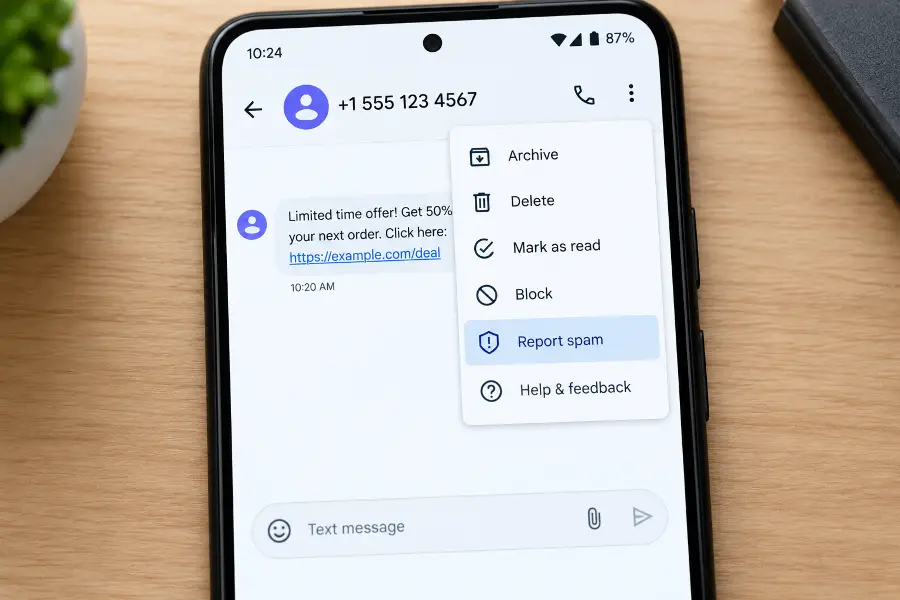
Reporting takes about fifteen seconds and does more than it appears to. Networks use the reports to block numbers and to feed filters, which is why the same template eventually stops arriving.
- Inside the appBoth Google Messages and iPhone offer Report Junk or Block and report spam directly in the conversation. This is the fastest route and the one that feeds the filters.
- Forward to 7726In the US, UK and several other countries, forwarding the message to 7726 (which spells SPAM) sends it to your mobile operator's abuse team free of charge.
- File a formal reportIn the US, reportfraud.ftc.gov for the scam and ic3.gov if money was lost. In the UK, Action Fraud. Elsewhere in Europe, your national police cybercrime unit or consumer protection authority.
- Tell the company being impersonatedMost banks and couriers have a dedicated phishing address, and they use reports to get fake sites taken offline, which protects the next person who receives the same message.
My experience
I kept every scam text I received over one month before writing this, which turned out to be twenty-three messages. Nine were parcel deliveries, five were tolls for a road I have never driven on, four claimed to be from banks I have no account with, three were wrong numbers, and two were job offers paying suspiciously well for work that was never described.
The one that genuinely caught me arrived on a Tuesday afternoon while I actually was waiting for a delivery. I got as far as opening the page before something felt off: the address bar said the site was in a country with no connection to the courier. I had been at the last step before typing a card number, purely because the timing was right. That is the whole trick. These messages are not clever, they are just patient enough to eventually arrive on a day when they fit.
Two things changed on my phone after that month. I turned on Filter Unknown Senders, which moved roughly two thirds of them out of my main list without hiding anything I needed. And I moved my important accounts off SMS codes onto an authenticator app, which took about twenty minutes in total.
The habit that helped most is smaller than any setting. I stopped acting on any message that contains a link, full stop. If a text says something needs attention, I close it and open the relevant app myself. It costs a few seconds, and it makes the entire category of attack irrelevant, because the message no longer has anything I might tap.
The takeaway
Every one of these scams depends on the same thing: convincing you to use the route it provided, before you have had time to check. Take that away and the whole thing collapses, regardless of how well written the message is or how real the sender name looks.
So keep one rule and you can forget the rest of this article. A text can tell you something might be wrong, but it never gets to be the way you deal with it. Close the message, open the app or type the address yourself, and look. If the problem is real, it will be there waiting for you.
💬 Comments