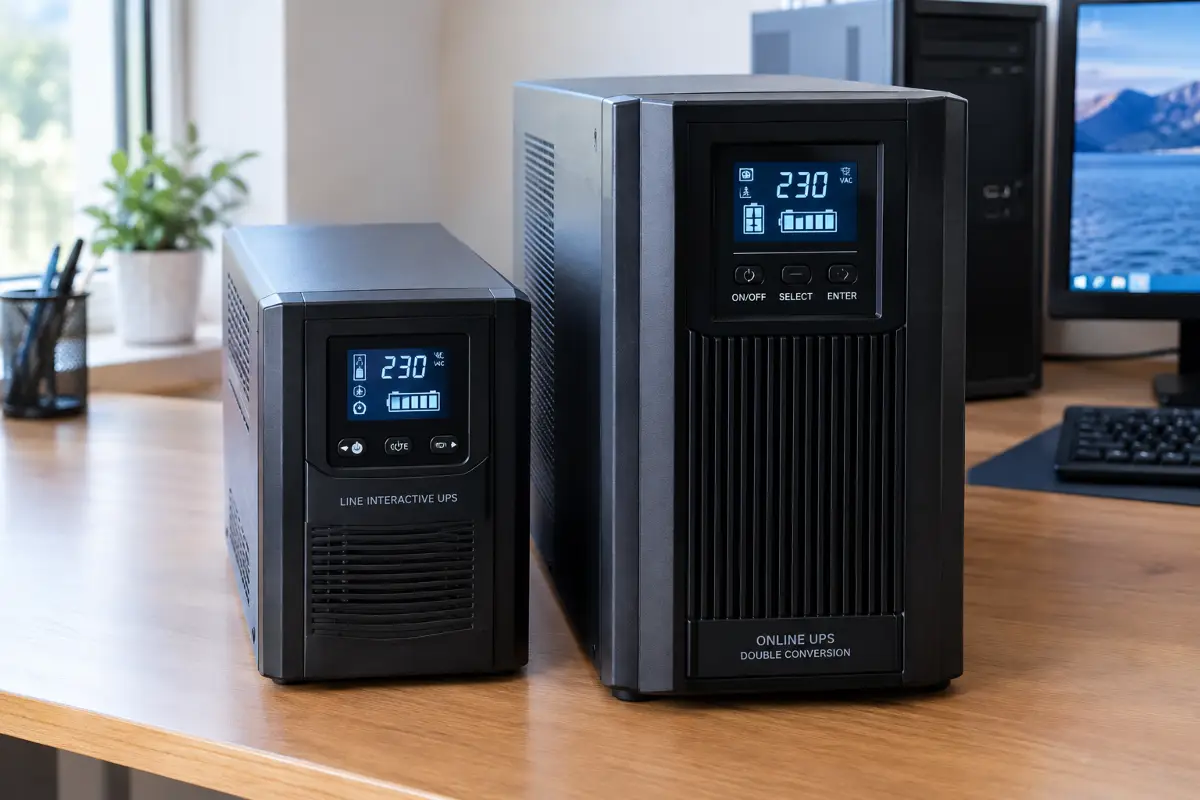
Most UPS buying guides just list wattage numbers and call it a day. This one goes further: it explains what is actually happening inside a line-interactive UPS versus an online double-conversion UPS, so you can tell whether your specific PC power supply needs a pure sine wave output, or whether you are simply paying extra for a technology your hardware will never notice.
Why This Question Actually Matters
A short power outage should be a non-event. Your UPS beeps, your PC keeps running on battery, and a minute later the power comes back with nothing lost. That is the story on the box. In practice, a lot of people discover the hard way that their brand new UPS does not do this at all: the moment the wall power cuts out, the PC shuts off exactly as if the UPS was not there. No blue screen, no graceful shutdown warning, just silence.
This is not a defective UPS. It is a mismatch between the type of UPS someone bought and the type of power supply installed in their computer. Cheaper UPS units produce a waveform that some modern PC power supplies refuse to run on when the UPS switches to battery, and the power supply protects itself by cutting out. Understanding the difference between a line-interactive UPS and an online double-conversion UPS is the only way to avoid buying the wrong one twice.
How a Line-Interactive UPS Works
A line-interactive UPS is the type sold in almost every electronics store, usually the cheapest type that is still worth considering for a PC. (An even simpler standby UPS exists, with no voltage regulator at all, but it is rarely a good match for a modern desktop.) Under normal conditions, it passes wall power through to your equipment with only minor filtering, while continuously trickle-charging its internal battery. It is called "line-interactive" because of one specific feature: an automatic voltage regulator, or AVR, built from a small autotransformer with multiple taps.
When incoming voltage sags or spikes slightly, the AVR switches taps to correct it, without ever touching the battery. This handles the small, everyday fluctuations that are actually the most common form of "bad power," especially in older buildings or areas with long distribution lines. Only when the voltage drops out completely, or falls far outside the AVR's correction range, does the UPS switch to its inverter and start drawing from the battery.
That switch is not instantaneous. It typically takes somewhere between 2 and 10 milliseconds, depending on the model. For most electronics this gap is invisible because internal capacitors bridge it without any visible interruption. A PC power supply is designed to ride through roughly 16 to 17 milliseconds at full load, and a lightly loaded PC gets even more headroom. The real story, though, is not the switching time. It is what comes out of the inverter once the battery takes over.
How an Online Double-Conversion UPS Works
An online double-conversion UPS takes a completely different approach, and the name describes exactly what it does. Incoming AC power is first converted to DC, then immediately converted back to AC through the inverter, before it ever reaches your equipment. That conversion happens continuously, all the time, whether the power is stable or not.
This has two direct consequences. First, your equipment is never actually connected to raw wall power at all; it is always running off the inverter's freshly generated output. Second, because the inverter is already running continuously, there is no "switch" to make when the wall power fails. The transfer time is effectively zero, because there was nothing to transfer in the first place.
The trade-off for this constant conversion is cost, size, and heat. Running two full conversion stages non-stop, 24 hours a day, requires a larger transformer, better cooling, and more robust components than a UPS that only kicks in occasionally. That is the core reason online double-conversion units cost noticeably more and run a cooling fan continuously, even when the power is perfectly fine.
Many online units also have an ECO or high-efficiency mode that passes clean mains power straight through to cut heat and electricity use. It works, but it brings back a short transfer time, so leave it off if zero transfer time is the reason you bought an online UPS.
Simulated Sine Wave vs Pure Sine Wave
Here is the detail that decides whether your PC survives a power outage gracefully or shuts off mid-task: what shape of electrical wave the UPS produces once it is running on battery. Wall power is a smooth sine wave. Many entry-level line-interactive UPS units, when running on battery, generate a "simulated" or "stepped approximation" sine wave instead: a rough, blocky imitation built from a few voltage steps rather than a smooth curve.
For simple resistive loads like an incandescent lamp, that stepped wave is functionally fine. For a modern computer power supply, it can be a problem. Most PSUs sold in the last decade use Active Power Factor Correction, commonly shortened to Active PFC, a circuit that expects a smooth sine wave input to regulate current draw. Many simulated waveforms include a brief moment of zero volts at each crossover, and an Active PFC circuit can read that as a power failure. The result varies: some PSU and UPS combinations run happily, while others whine, run hot, or shut the whole PC down the instant the UPS takes over. Your PSU maker's and UPS maker's compatibility notes matter more than any general rule, and pure sine wave is the safe choice when they say nothing.
An online double-conversion UPS avoids this entirely, because its inverter always outputs a genuine pure sine wave, not just when switching to battery but at all times, since your equipment is always running off that inverter. Higher-end line-interactive models exist too, ones that advertise "pure sine wave" output specifically to solve this exact problem, and they sit in a useful middle ground price-wise.
Why Your PSU Decides Which UPS You Need
The single most useful thing you can do before buying any UPS is check what kind of power supply is already inside your PC. This is a five-minute job and it removes almost all the guesswork.
Active PFC power supplies
Most modern PSUs, including the vast majority of 80 Plus certified units, use Active PFC. Look for "Active PFC" on the PSU's label, or check the manufacturer's spec sheet if the unit is hidden. These are the units most likely to have trouble with a simulated sine wave, so a pure sine wave UPS is the safe pick.
Passive PFC or non-PFC power supplies
Older or very basic budget PSUs use passive or no PFC at all. These generally tolerate a simulated sine wave without issue, since they are less sensitive to the exact waveform shape. Routers, modems and most chargers are usually relaxed about it too, but check the UPS maker's compatibility note.
When in doubt
If the label is worn off or the PSU is unbranded, treat it as Active PFC and plan around a pure sine wave source. The downside of being wrong the safe way is a slightly higher UPS cost; the downside of being wrong the other way is a PC that shuts off during every single outage.
Price Comparison: What You're Actually Paying For
The price gap between the two UPS categories is not marketing markup, it reflects genuinely different internal components. The table below lines up the practical differences for a typical single-PC home setup in the 600 to 1000VA range.
| Aspect | Line-Interactive | Online Double Conversion |
|---|---|---|
| Output waveform (on battery) | Simulated, unless "pure sine wave" model | Always pure sine wave |
| Transfer time | Typically 2-10 ms | 0 ms (always inverting) |
| Typical price, 600-1000VA | Lower | Often 2-4x higher |
| Noise level | Silent unless on battery | Continuous fan noise |
| Efficiency (mains mode) | Higher, minimal conversion loss | Lower, always converting |
| Heat and battery life | Runs cool, battery rarely used | Runs warmer, which can shorten battery life |
| Watts vs VA | Often about 60-70% of the VA figure | Often 90-100% of the VA figure |
| Best suited for | Single PC, non-PFC or tolerant loads | Active-PFC PSUs, servers, multiple sensitive devices |
The short version: you are not paying extra for a fancier brand name. You are paying for a second permanently-running inverter stage, better cooling, and a genuinely clean waveform at all times, not just an approximation during an outage.
Who Actually Needs Which Type
Not every setup justifies the premium of an online double-conversion unit, and not every budget line-interactive UPS is a mistake. It comes down to what you are protecting and how sensitive it is.
A line-interactive UPS makes sense when
Your PSU is passive PFC or non-PFC, or it is explicitly labeled "pure sine wave" line-interactive.
You are protecting one desktop or a router, not a rack of sensitive gear.
Budget matters more than a zero-millisecond transfer time.
An online double-conversion UPS makes sense when
Your PSU has Active PFC and you want zero risk of shutdown on outage.
You run a home server, NAS, or recording setup that cannot tolerate any interruption.
You are protecting several devices at once, spreading the cost across more value.
There is also a practical middle path worth mentioning: several line-interactive models now ship with genuine pure sine wave inverters while keeping the lower cost and higher efficiency of the line-interactive design. For a single Active-PFC gaming PC, this is often the sweet spot, delivering the one feature that actually matters without paying for zero transfer time you will likely never notice.
Whichever type you pick, size it by watts, not by the VA number on the box. Add up your PC's real draw under load, leave a healthy margin, and remember that some UPS makers advise against running a unit above roughly 80% of its rated watts. You do not need long runtimes either: five to ten minutes is plenty to save your work and shut down. Connect the UPS to the PC with its USB cable and enable the automatic shutdown option in the UPS software so the PC closes itself cleanly if you are away.
What to Look for When Choosing a UPS
Compatibility between the UPS and the computer's power supply is important, especially with systems that use Active-PFC. A budget line-interactive UPS with a simulated sine wave output can, in some cases, cause a computer to shut down when mains power is lost.
If your PC is important for work, data storage, or other tasks that should not be interrupted unexpectedly, consider a UPS with a pure sine wave output. It is also important to check the specifications of both the UPS and the power supply to ensure they are properly matched.
For equipment that needs uninterrupted operation, an online double-conversion UPS provides continuous power through its inverter and eliminates the transfer gap when mains power fails. It is a more expensive solution and usually unnecessary for a typical home PC, but it can be worthwhile for NAS devices, servers, and other equipment that must remain running continuously.
💬 Comments